> For the complete documentation index, see [llms.txt](https://mintpad.gitbook.io/docs/llms.txt). Markdown versions of documentation pages are available by appending `.md` to page URLs; this page is available as [Markdown](https://mintpad.gitbook.io/docs/more/creator-profile.md).
# Creator Profile
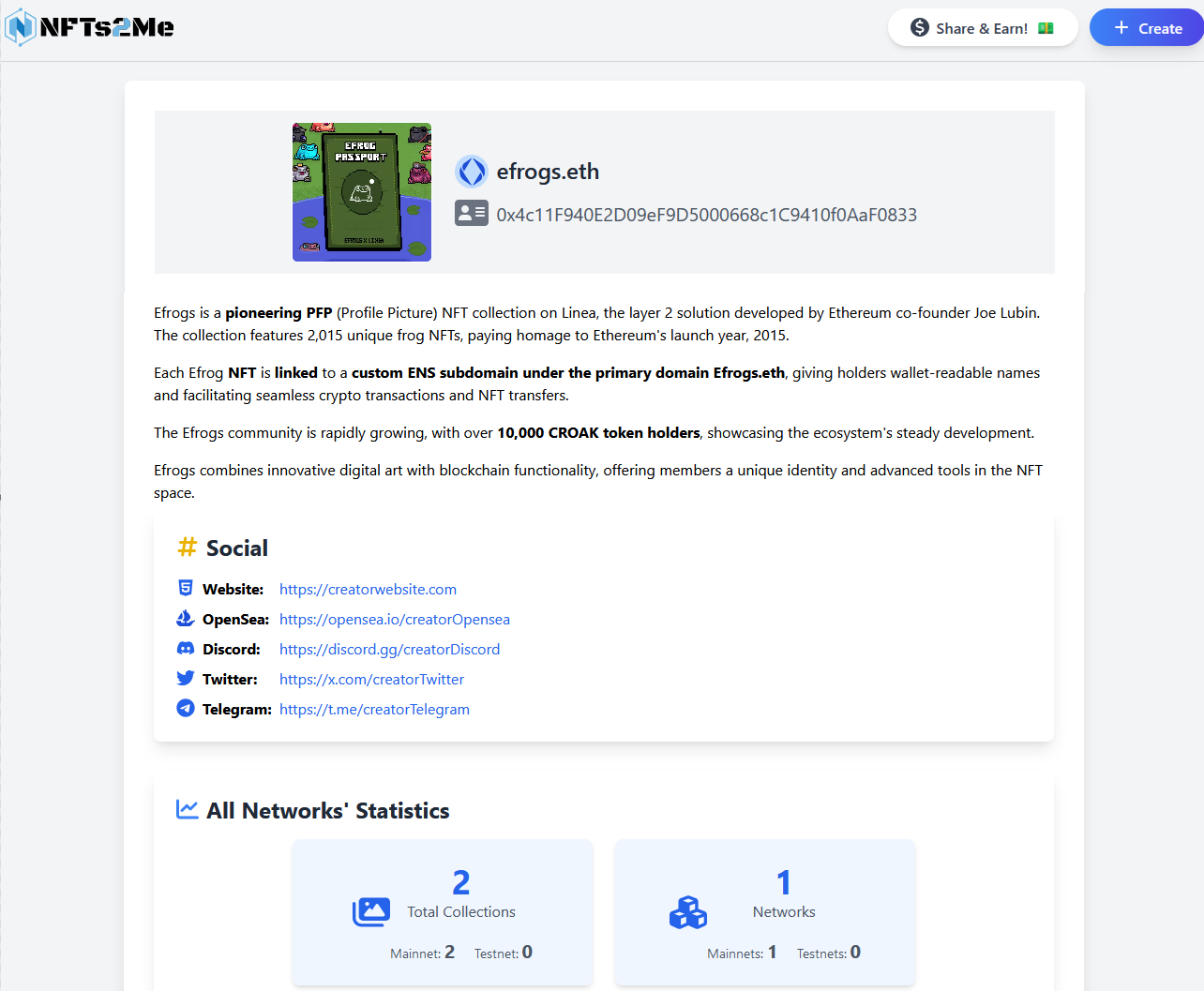
The **Creator Profile** section provides comprehensive **information** about a **creator** based on their wallet **address**. This section is designed to **give users insights into the creator's activity**, **collections**, and overall **impact within the NFT ecosystem**. Below, we'll explain the different sections and the information available on the Creator Profile page.
The **Creator Profile** is an essential tool for exploring and understanding a creator's contributions to the NFT space. Whether you're looking to engage with their collections, **analyze** their **activity**, or **verify** their **authenticity**, this page provides a centralized hub for all relevant information.
Since our dApp is **multichain**, it will display information about the creator across all chains.
{% hint style="info" %}
Thanks to this section, you can explore a creator's journey, their past collections, and the impact they've made in the NFT world. This way, you'll no longer be in the dark when minting from a collection
{% endhint %}
{% hint style="warning" %}
The **statistics** only refer to **data related to collections created using Mintpad**. Other collections that the address may have deployed on another platform or through other means will not be considered. This will be expanded, but this is how it works for now.
{% endhint %}
## **How to Access a Creator's Profile**
You can access a creator's profile from two different locations:
**1) From the Minting Page of a Collection**
On the minting page, the creator's profile icon will appear. Clicking on it will open the creator's profile for that collection in a new tab. This is very useful for learning more about the artist and their journey.
**2) From the Trending Collections Page**
You can view the creator's profile information for any collection listed on the trending page by clicking on the corresponding icon.
## **Error Handling**
If, for any reason, the **address is incorrect**, the page will notify you in the following way:
If that **address has never created a collection on Nfts2Me** and, therefore, we have **no statistics** about it, the system will indicate this as follows:
## Profile Sections
### **1. Profile Overview**
At the top of the page, you will find **information** related to the wallet, including its **image**, **ENS** information, and **address** details:
* **Wallet Address**
* Displays the creator's wallet address prominently at the top of the profile page.
* If the creator has an **ENS (Ethereum Name Service)**, it will be shown alongside the wallet address to facilitate **easier identification**.
* **Image:**
The displayed image can be one of three types, and the creator can select which one to use:
1. **ENS Image:**
* If the wallet address has an image set up in **ENS**, that image could be displayed.
2. **Creator Image:**
* The creator can **upload** an **image** to **IPFS**, which will be shown on their profile.
3. **Auto-generated Image:**
* If no image is available or if the creator prefers, a **unique polygonal** image will be **auto-generated** for the address.
* This image is **always the same for a specific address** and is not random, ensuring consistency across views.
### **2. Social Links and Contact Information**
This section provides a space for the creator to specify any information about themselves or their project that they consider relevant.
**Linked Profiles and Websites**
If the creator has added any social profiles or websites, they will be displayed here. These may include:
* **Twitter**: Link to their official Twitter profile.
* **Discord**: Connection to their community or server.
* **Personal or Project Websites**: Websites that provide more details about the creator or their project.
* **OpenSea**: Link to their OpenSea profile or collections.
* **Telegram**: Contact or group link for direct communication.
{% hint style="info" %}
This section helps users get a deeper understanding of the creator and connect with them or their community.
{% endhint %}
### **3. Creator's Statistics**
This section provides a global overview of the **creator's activity**. It provides users with a detailed understanding of the creator's overall activity, deployment habits, and network performance metrics. This section is beneficial for identifying **multichain** creators and evaluating their **impact**.
The section is split into three main areas:
#### **1) Collections and Networks**
1. **Total Collections:**
* Displays the total **number** of **collections** deployed on Nfts2Me by the creator using the address.
* **Separates** the count into collections created on **mainnets** and **testnets**, giving a clear view of the deployment distribution.
2. **Networks:**
* Shows the total **number** of **distinct networks** on which the creator has **deployed** his collections.
* This number indicates whether the creator is **multichain**:
* If the creator has deployed 100 collections, but all on the same chain, it will display **1**.
* Further breakdown:
* Indicates how many of these networks are **mainnet** and how many are **testnet**.
#### **2) Totals**
The totals section provides an **aggregated view of key metrics** but only considers ***specific blockchains***. Hovering over any value will display a tooltip with the list of blockchains included.
1. **Total NFTs Minted:**
* Displays the **cumulative** number of **NFTs minted** across all the creator's collections and **all networks**.
2. **Unique Holders:**
* Reflects the **number** of **unique wallets** holding the creator's NFTs across all their collections.
* **Note:** If a wallet holds NFTs in two collections, it will be counted twice.
3. **Total Sales Volume:**
* Shows the total **revenue** generated from **minting fees**.
* Does **not** include **earnings** from **secondary markets** or other revenue streams.
Tooltip with the list of blockchains included.
#### **3) Dates**
1. **Last Mint Date:**
* Displays the date when the **last mint was performed** in **any** of the creator's **collections**.
* This date **only considers specific blockchains**, and hovering over the field will display a tooltip listing the networks included.
2. **First Collection Creation Date:**
* Indicates the date when the creator deployed their **first collection** on Mintpad.
3. **Most Recent Collection Creation Date:**
* Indicates the date when the creator **deployed** their **most recent collection** on Mintpad.
### **4. Awards Section**
This section provides insight into the **creator's engagement and achievements in the NFT ecosystem**. Based on the activities and statistics associated with their address, the creator earns **badges** as **recognition for their accomplishments**. The more significant their contributions, the more badges they receive.
#### **Purpose of the Awards**
* **Showcase Engagement:** These badges highlight the creator’s activity level and success within the NFT ecosystem.
* **Build Credibility:** Badges help users identify experienced and impactful creators.
* **Encourage Growth:** This system incentivizes further contributions and innovation in the platform by rewarding creators.
{% hint style="info" %}
The Awards Section is an excellent way for users to evaluate a creator's achievements and overall involvement in the NFT ecosystem, providing deeper context to their journey across multiple chains
{% endhint %}
#### **Available Badges**
Here’s a list of badges that can be earned and the criteria for receiving them:
1. **Free Collection Creator:**
* Awarded to creators who have launched at least a free collection (no creator mint fee).
2. **Community Builder:**
* Granted for having more than 20 **unique holders** in at least one collection (not across all collections).
3. **Active Minters:**
* Awarded for having more than 20 real mints in at least one collection (not airdrop).
4. **High Sales Volume:**
* Granted to creators who achieve a high total sales volume in minting fees exceeding 1 ETH. This only applies to collections where the mint fee is denominated in ETH.
5. **New Collections Creator:**
* Awarded for releasing new collections this month, demonstrating significant activity and engagement in the NFT space.
6. **Platform Veteran:**
* Awarded to creators on the platform for over a year (calculated from the current date).
7. **Mainnet Creator:**
* Awarded to creators who have successfully deployed at least one collection on a mainnet blockchain, showcasing their commitment to reaching a broader audience in the NFT ecosystem.
8. **Testnet Explorer:**
* Granted for deploying collections on **testnets**, demonstrating exploration and testing efforts.
9. **Multi-Chain Creator:**
* Awarded to creators who have deployed collections across multiple blockchains.
### **5. Blockchain statistics and collections**
This section lets users view the **creator's statistics and collections on a specific blockchain**. The section features a dropdown menu listing all the **blockchains** where the **address has deployed** collections. **If the address hasn't been deployed on a blockchain, it will not appear in the list**.
This section provides a detailed **breakdown of the creator's activity on each blockchain**, offering users an organized way to explore their collections and associated metrics. The dynamic filtering by blockchain ensures clarity and precision in analyzing the creator's impact.
{% hint style="info" %}
Provides the flexibility to analyze the creator's activity across different networks.
{% endhint %}
The user can choose between these two options.
1. **All-Chains:**
* Displays aggregated statistics and collections across all chains where the address has deployed collections.
* To avoid redundancy, the global statistics section is not repeated, and only deployed collections are displayed.
All chains collections
2. **Specific Chain:** Selecting a particular blockchain will show only the creator's statistics and collections **for that chain**.
Specific chain statistics
#### **Collections Section**
Both open and closed or sold-out collections are displayed, serving as a historical record of the collections deployed with that address.
This section is linked to the blockchain selected in the dropdown:
* **All-Chains:** Displays all collections created by the address across any chain.
* **Specific Chain:** Shows only the collections deployed on the selected blockchain.
#### **Collection Order:**
* Collections are listed in descending order based on the **total number of mints**.
#### **Details for Each Collection:**
1. **Collection Name:**
* Displays the collection's name, which links to its **minting page** for further exploration.
2. **Chain Icon:**
* Specifies the blockchain where the collection was deployed (e.g., Ethereum, Polygon).
3. **Created:**
* It shows the time that has elapsed since the collection was created.
4. **Key Metrics:**
* Displays key statistics, including:
* **Total NFTs minted**
* **Unique holders**
* **Overall performance**
5. **Status:**
* Indicates whether the collection is:
* **Active:** Available for minting.
* **Sold Out:** All NFTs have been minted.
* **Closed:** The collection is no longer mintable.
6. **Collection Size:**
* Displays:
* Total supply of the collection.
* Current size and the percentage of mints completed.
* It will be explicitly noted if the collection is an Open Edition (unlimited NFTs).
7. **Mint Fee:**
* The price per mint for the collection.
8. **Mint Option:**
* A button that redirects users to the minting page allows users to mint NFTs from that collection.
9. **Last Mint Time:**
* Indicates the date and time of the most recent mint within the collection.
## How can I set up my profile as a creator?
To set up your profile as a creator, visit the URL:
[**https://mintpad.co/creator/creatorProfile**](https://mintpad.co/creator/creatorProfile)
You can also access it from your project dashboard. There is an option to customize your creator profile:
If you access the creator profile for your address and haven't set anything up yet, the following will be displayed in the social links and information section. Additionally, an image will be automatically generated for your address if you don't have an ENS.
Let's examine the different sections you can customize for your address profile as a creator. For each option, the address owner can specify whether they want that field of information to be visible or not.
### 1) Basic Information
In this section, you can set the name you want to display as a creator to the community and describe yourself or your project. The description includes an editor that allows you to format the information you want to showcase
### 2) Profile Image
The creator can choose three options for the image they want to display to the community.
* Auto-generated image: This is the default option if the creator hasn’t set an image or doesn’t have an ENS. It's an image generated using polygons, unique for each address. For the same address, the displayed image will always remain the same.
* Creator's selected image: The creator can set any image they want. This image will be uploaded to IPFS and made available.
* ENS image: If you have an ENS and have set an image, you can specify that you want it to be the image displayed on your creator profile
### 3) Social Links
Here you can provide links to your project's website and all your social media accounts.
{% hint style="warning" %}
Very important. Once you’ve made changes, you’ll see a button at the bottom indicating that you can save them. **Don’t forget to save your changes**!
{% endhint %}
.png?alt=media)
.png?alt=media)
.png?alt=media)
.png?alt=media)
.png?alt=media)
.png?alt=media)
.png?alt=media)
.png?alt=media)
.png?alt=media)
.png?alt=media)
.png?alt=media)
.png?alt=media)
.png?alt=media)
.png?alt=media)
.png?alt=media)
.png?alt=media)
.png?alt=media)
.png?alt=media)
.png?alt=media)
.png?alt=media)
.png?alt=media)
.png?alt=media)
.png?alt=media)
.png?alt=media)