# Custom mint pages and widget

### Collection Description, Banner, and Logos

{% hint style="info" %}
Customize your collection mint page and send the link to your partners and friends.
{% endhint %}

Please set up a **custom mint page** with your **subdomain** (for free!) so users can easily mint your NFTs or embed them in your website using our widget. You can set your own custom subdomain hosted by us or use your own website/domain ([Booster Pack](https://mintpad.co/booster/) required).

Please refer to the 'Minting Page' section for further information about the minting page.

You can access this section by selecting the 'Minting page' option from the left-hand menu within your collection management dashboard.

<figure><img src="https://4118262152-files.gitbook.io/~/files/v0/b/gitbook-x-prod.appspot.com/o/spaces%2FtP38LX7mJsfWKTrriMU4%2Fuploads%2Fgit-blob-bcb4de5dc422f8f7b1e73e29b572135c7601e73b%2FmintingPageOption.png?alt=media" alt=""><figcaption><p>Minting page customization option menu</p></figcaption></figure>

<figure><img src="https://4118262152-files.gitbook.io/~/files/v0/b/gitbook-x-prod.appspot.com/o/spaces%2FtP38LX7mJsfWKTrriMU4%2Fuploads%2Fgit-blob-6dc0df683d3a16e1ac772329d30d13d3c27dd0a8%2Fimage%20(143).png?alt=media" alt=""><figcaption></figcaption></figure>

You can customize the Collection URL, the Collection Name, and its description using Markdown.

By default, we generate a "Logo Image", a "Feature Image", and a "Banner Image" for you, but you can choose to change them at any moment. We provide descriptions explaining the purpose of each type of image, as well as where and how they will be utilized:

* **Logo image**: It will be used as the main image of the collection on the minting page. For optimal appearance and optimization, it is recommended to use a size and resolution of 400x400
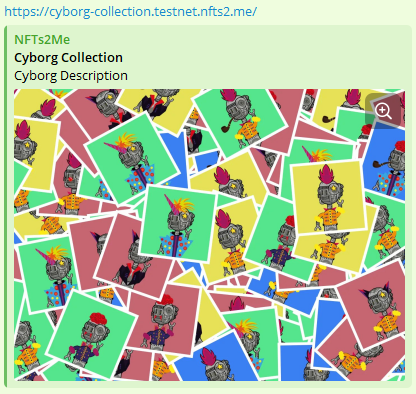
* **Featured image**: This image will be used when you share the URL of the Minting page on social media platforms such as Twitter or Telegram. For optimal appearance and optimization, it is recommended to use a size and resolution of 1400x1050.

<figure><img src="https://4118262152-files.gitbook.io/~/files/v0/b/gitbook-x-prod.appspot.com/o/spaces%2FtP38LX7mJsfWKTrriMU4%2Fuploads%2Fgit-blob-103fcd0cd3e2ab5fed951911ca61c2344ab01fc4%2Fcyforg-featured.png?alt=media" alt=""><figcaption><p>Appearance of the featured image when sharing the link via Telegram</p></figcaption></figure>

{% hint style="warning" %}
When you share the link on a social network, it caches the associated image. So, if you modify it, it may not refresh immediately, and you may have to wait or request the network to refresh it.
{% endhint %}

* **Banner image**: This will be the image used as the background at the top of the Minting page. For optimal appearance and optimization, it is recommended to use a size and resolution of 1400x350

### Themes & Layout

To further customize your minting page, we've added several options to choose your design and colors. The Color Palettes allow you to select incredible predefined colors for your minting page. However, you can also fully customize them, including backgrounds, text, or even **button colors**!

We've added a **Preview Layout** so that you can easily preview the final design of your collection.

<figure><img src="https://4118262152-files.gitbook.io/~/files/v0/b/gitbook-x-prod.appspot.com/o/spaces%2FtP38LX7mJsfWKTrriMU4%2Fuploads%2Fgit-blob-f06e8029ebf36ffdb3b5354c68ba520d7d8c21a3%2Fimage%20(144).png?alt=media" alt=""><figcaption></figcaption></figure>

Using the "**Extra Information**" buttons, you can add or remove **information and/or sections** of the **minting page layout**.

<figure><img src="https://4118262152-files.gitbook.io/~/files/v0/b/gitbook-x-prod.appspot.com/o/spaces%2FtP38LX7mJsfWKTrriMU4%2Fuploads%2Fgit-blob-bdeed4ed1b1c06a8a9d8a70111a9faa4f271783a%2FmintingPageExtraInfo.png?alt=media" alt=""><figcaption><p>Extra information section</p></figcaption></figure>

We're going to explain what each of the options is for:

* **NFT Showcase Active**: When active, a showcase of the collection NFTs will be shown on the minting page, indicating which are minted and which are not. If using a placeholder, the information will be shown instead of the actual information.

<figure><img src="https://4118262152-files.gitbook.io/~/files/v0/b/gitbook-x-prod.appspot.com/o/spaces%2FtP38LX7mJsfWKTrriMU4%2Fuploads%2Fgit-blob-5562bad82c94d7f59376d6f0af8c6d148fa3aa90%2Fimage%20(117).png?alt=media" alt=""><figcaption></figcaption></figure>

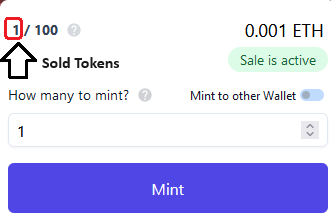
* **Show sold NFTs**: You can hide the number of sold NFTs on the minting page. Note that this won´t be hidden on the blockchain, which is public and immutable.

<figure><img src="https://4118262152-files.gitbook.io/~/files/v0/b/gitbook-x-prod.appspot.com/o/spaces%2FtP38LX7mJsfWKTrriMU4%2Fuploads%2Fgit-blob-b5ac1e562568b7edf6da0396e44bf002dfe42f78%2FsoldTokens.png?alt=media" alt=""><figcaption></figcaption></figure>

* **Show Banner Image**: When active, the image of the banner you have chosen will be displayed at the top of the minting page.

<figure><img src="https://4118262152-files.gitbook.io/~/files/v0/b/gitbook-x-prod.appspot.com/o/spaces%2FtP38LX7mJsfWKTrriMU4%2Fuploads%2Fgit-blob-ef348be5c70fd8cbda0ccffbef33e9f6d089dcff%2Fimage%20(119).png?alt=media" alt=""><figcaption><p>Banner image at page top</p></figcaption></figure>

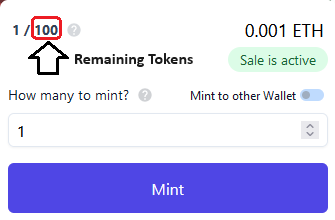
* **Show remaining NFTs supply**: You can hide the NFTs supply (and amount of remaining NFTs) on the minting page. Note that this won´t be hidden on the blockchain, which is public and immutable.

<figure><img src="https://4118262152-files.gitbook.io/~/files/v0/b/gitbook-x-prod.appspot.com/o/spaces%2FtP38LX7mJsfWKTrriMU4%2Fuploads%2Fgit-blob-02e1775a7f72cc9cb0d4b36a24759b136ab771eb%2FremainingTokens.png?alt=media" alt=""><figcaption></figcaption></figure>

{% hint style="info" %}
You can play around with the different options and try out how your Minting page looks until you find the result you expect.
{% endhint %}

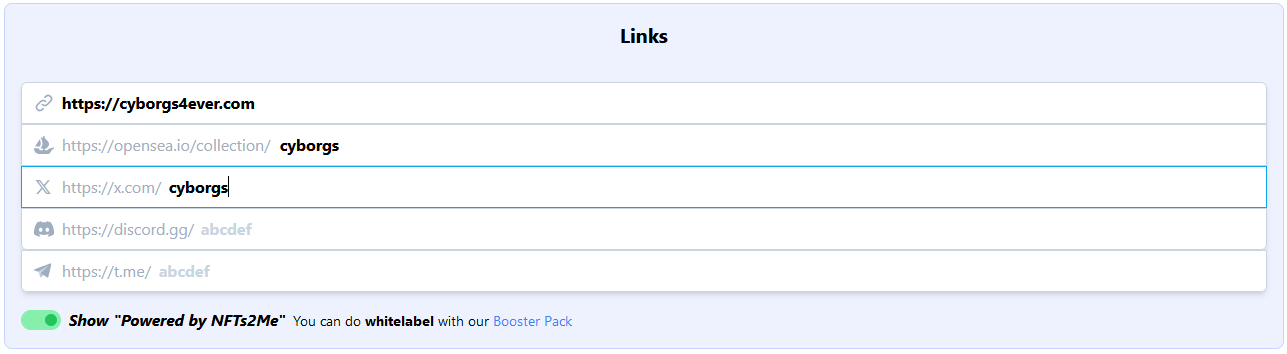
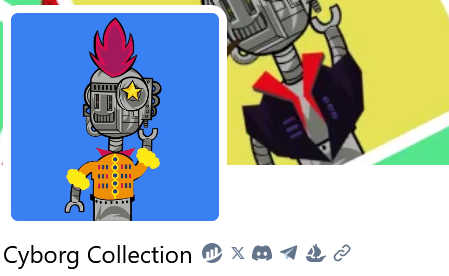
Finally, you can easily add some **links** to your minting page that may be interesting to your users. This will display icons for them on the Minting page. When users click on them, the page will take them to the URLs you have defined.

<div align="center" data-full-width="false"><figure><img src="https://4118262152-files.gitbook.io/~/files/v0/b/gitbook-x-prod.appspot.com/o/spaces%2FtP38LX7mJsfWKTrriMU4%2Fuploads%2Fgit-blob-b5e4c5de3e1f4dd660ad4c4264f9f559c131c436%2Fmintingpage_linls.png?alt=media" alt=""><figcaption></figcaption></figure></div>

<figure><img src="https://4118262152-files.gitbook.io/~/files/v0/b/gitbook-x-prod.appspot.com/o/spaces%2FtP38LX7mJsfWKTrriMU4%2Fuploads%2Fgit-blob-a277bd724f319ac9dd66d85c90be07f885e0ce9d%2Fcyborg-links.png?alt=media" alt=""><figcaption><p>Link icons showed at minting page</p></figcaption></figure>

The 'powered by' banner is enabled by default, which implies that it will appear at the bottom of the Minting page.

<figure><img src="https://4118262152-files.gitbook.io/~/files/v0/b/gitbook-x-prod.appspot.com/o/spaces%2FtP38LX7mJsfWKTrriMU4%2Fuploads%2Fgit-blob-906002a06b0d130b0e663f9f5fd1c511f6742152%2Fimage%20(114).png?alt=media" alt=""><figcaption><p>Enable/Disable "Powered by" option</p></figcaption></figure>

<figure><img src="https://4118262152-files.gitbook.io/~/files/v0/b/gitbook-x-prod.appspot.com/o/spaces%2FtP38LX7mJsfWKTrriMU4%2Fuploads%2Fgit-blob-630aae7bef43ac6bc3b93a1a45b11459ba4e612e%2Fimage%20(115).png?alt=media" alt=""><figcaption><p>Bottom "powered by" banner displayed</p></figcaption></figure>

{% hint style="info" %}
**Create** your **white-label brand**. The "**Show Powered by Mintpad**" option **can be disabled** if you hold a Mintpad/NFTs2Me Booster Pack. Read about the benefits of having a [Booster Pack](https://mintpad.co/booster/).
{% endhint %}

{% hint style="danger" %}
:scream::scream::scream::scream::scream::scream::scream::scream::scream::scream::scream:

**Remember to always save your changes by clicking the button at the bottom of the page. If you don't, your changes will not be saved, and the Minting page will not be updated.**
{% endhint %}

You have more info in the "Minting page" section.